 You never learn enough… (about Windows, I mean).
Problem.
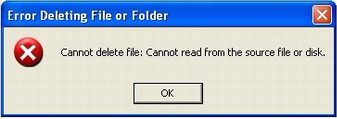
During a routine backup operation, I found a Windows NTFS drive contained several files and folders which could not be deleted due to wrong naming.
Yes, it’s 2014 and we’re still having this kind of problems…
Weird character (the drive was shared with Mac users) and italian accents were quite common in the file structure.
I found myself stuck as I tried to delete them from either Windows Explorer and the old, venerable, DOS prompt.
No DEL, RMDIR, COPY or REN worked.
Solution.
A Microsoft KB Note came in handy.“God is in details”.
Provided you need to delete a file and/or a folder from the command prompt like this:
DEL filename
or
RMDIR foldername (with optional parameter /S for subfolders)
Path names is a key issue and you should use the TAB key as a help to compose correct path just like this:
DEL “f:\some path with spaces\some other path\some wèéird nàme.txt”
The ultimate touch from the MS KB brings some more magic:
DEL “\\?\f:\some path with spaces\some other path\some wèéird nàme.txt”
The \\?\ character sequence before the complete path forces any DOS command, be if DEL, RMDIR o REN, and allows us to get rid of the dreaded files&folders.
Hope this is useful to you as it’s been to me 😉



 .
.















 and as
  just recently.
 or an image of the real Norad?


 sequence.